Skip to content
View in the app

A better way to browse. Learn more.

U.S. Militaria Forum

A full-screen app on your home screen with push notifications, badges and more.

To install this app on iOS and iPadOS
  1. Tap the Share icon in Safari
  2. Scroll the menu and tap Add to Home Screen.
  3. Tap Add in the top-right corner.
To install this app on Android
  1. Tap the 3-dot menu (⋮) in the top-right corner of the browser.
  2. Tap Add to Home screen or Install app.
  3. Confirm by tapping Install.

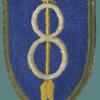
WW1 Marine 5th Brigade patch

Featured Replies

#1

I dug this out from the depths. I bought in about 1982 along with a set of collar disks, and an EGA that has only the horizontal lines.


5thbrigade.jpg


I'm curious what you think...


also, what time period were EGA's just horizontal lines ont he globe?

#2

Any picture of your CD & EGA emblem?

T

  • Author
#3

I will take them when I have a minute. I already have some opinions on this patch, but I am curtious as to what people here think.

#4

Can you show the EGA in the EGA disscusion forum please.

  • Author
#5

and posted there...

#6

So-called Stokes Kirk chain stitch patch. Made for veterans between the wars.


Chris


I dug this out from the depths. I bought in about 1982 along with a set of collar disks, and an EGA that has only the horizontal lines.

5thbrigade.jpg

I'm curious what you think...


also, what time period were EGA's just horizontal lines ont he globe?

Create an account or sign in to comment

Account

Navigation

Search

Search

Configure browser push notifications

Chrome (Android)
  1. Tap the lock icon next to the address bar.
  2. Tap Permissions → Notifications.
  3. Adjust your preference.
Chrome (Desktop)
  1. Click the padlock icon in the address bar.
  2. Select Site settings.
  3. Find Notifications and adjust your preference.