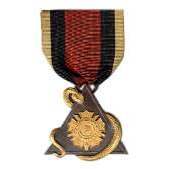
September 11, 201015 yr #1 Hello, All, I have come across two badges which appear to represent membership in an organization entitled the "Standard Bearers Association". There is a date on the obverse of 1889. I don't know the history of this organization, but I believe it to be military in nature, perhaps related to the Civil War. I was wondering if anyone could shed some light on this organization. The badges I have, one bronze in color, the other silver, were both made by the Metal Arts Company of Rochester, NY. Bronze Version Thanks, Kevin
November 5, 201015 yr #3 I'm not 100% sure but I these were veterans who would be standard bearers at funerals, parades and other functions. Have you found out anything since your initial post? Cool medal by the way!
March 7, 201313 yr #4 I think I found what you need. Go to https://docs.google.com/viewer?a=v&q=cache:Oa2wRt1D028J:www.libraryweb.org/~digitized/books/Brief_history_of_the_Washington_Birthday_exercises.pdf+standard+bearers+association+washington&hl=en&gl=us&pid=bl&srcid=ADGEESgz0YfbiCvUjVteQ8rAjursMYsduJdQl5sJAKwJaAhItp1mggl69A8T94icTW_9yCwADX3VFhYfUXTkD18ET8TluJFOSBym0IlP1wVFJYUunwrmBVaquK3pYKX1JIRNYVMWlq_W&sig=AHIEtbQuzOsMYhE6HxSJ1T1op6QdwrYehQ EEverything you need is on the first three pages. Even the front cover has 1889 reference
March 24, 201313 yr Author #5 Mr. All-Bull, I just got around to reading the document, A Brief History of the Washington Birthday Exercises, The Washington Convention, and the Transfer of Flags, that you posted via your link. That is exactly what I had hoped to find. It explains the origins of the organization and even references the presentation of badges. Thank you very much! Kevin





Create an account or sign in to comment