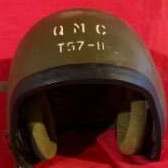
January 6Jan 6 #1 The Israeli firm Orlite Engineering made 10,002 DH132A CVC Helmets under an FY 1987 Defense Logistics Agency (DLA) contract for issue to U.S. troops. At this time Orlite was already making the DH132A as the OR603A. They were also making the equivalent of the non-ballistic shell DH132 as the OR603. On a related topic, U.S. DH132 shells made it to Israel and were repainted for IDF use. Here are some examples that I found, all but one of my examples was made under a DLA contract. The shell that wasn’t made under a DLA contract has a smooth glossy shell exterior. All the shells were marked for size. The Hebrew letter Bet (ב) for medium, and the Hebrew letter Gimel (ג) for large. A small shell would be marked with the Hebrew letter Alef (א). Unfortunately I don’t have one. For the Israeli DH132 shells made I placed the images of helmet label first, followed by the shell exterior. Has anyone else run across an Orlite-made DH132A or DH132 shells for Israeli use?
16 hours ago16 hr Author #2 I was checking my DH-132 contract information and the 936 helmets (not a typo, only 936) made under contract 100-79-C-2493 were made for export. Too bad I don’t have the liner and headset-microphone kit.





Create an account or sign in to comment