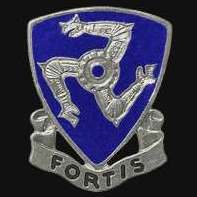
August 28, 20232 yr #1 I looked through my ASMIC books and couldn't come up with an ID for this unit. The only "It Shall Flourish" motto I could find was from the short-lived 532nd Coast Artillery Battalion. However, I've seen those DUIs and they look far different from this. The DUI in the photo is clutchback and it looks pretty modern to my eyes. Maybe a 532nd CA made for collectors long after the unit was disbanded? Many thanks!
August 28, 20232 yr #2 Based on the ASMIC website database search function, This DUI was featured in the July-September 1979 TRADING POST on Page 49 and in the comments section it is/was determined that it was made by Aresta for Collectors. There were no hallmarks on the back. This was in the REPRODUCTION DUI portion of the TRADING POST starting on page 47. Leigh
August 28, 20232 yr Author #3 Thanks very much for the quick and helpful reply, Leigh. I'll try to get my hands on that TP article. Did it by any chance attribute it to a specific unit?
August 29, 20232 yr #4 It was attributed to the 532nd Coast Artillery according to the writeup. Not the best image but this is the information I found in the TP. Leigh
September 1, 20232 yr Author #5 That's perfect, Leigh. Thanks very much for confirming, I really appreciate it! And you just gave me a good reason to re-up with ASMIC... Bob



Create an account or sign in to comment