Skip to content
View in the app

A better way to browse. Learn more.

U.S. Militaria Forum

A full-screen app on your home screen with push notifications, badges and more.

To install this app on iOS and iPadOS
  1. Tap the Share icon in Safari
  2. Scroll the menu and tap Add to Home Screen.
  3. Tap Add in the top-right corner.
To install this app on Android
  1. Tap the 3-dot menu (⋮) in the top-right corner of the browser.
  2. Tap Add to Home screen or Install app.
  3. Confirm by tapping Install.

Navy Club of the United States of America

Featured Replies

#1

Navy_Club_logo.jpg.1b805efa6eec2cfd4d7cfaf0c4dc9f41.jpg

NAVY CLUB of the UNITED STATES of AMERICA


"In reverent recognition of Divine Guidance, we associate ourselves together, pledging ourselves to maintain true allegiance to the Government of the United States of America and fidelity to its Constitution and Laws. The objects of this Association are; to further encourage, promote and maintain comradeship among our members; to revere, honor and perpetuate the memory of our departed shipmates; to promote and encourage further public interest in the United States Navy and its history; and to uphold the spirit and ideals of our Navy."


PXL_20230528_2040165342.jpg.fafd2ac5f980e6148f56b5d5345bebc2.jpgPXL_20230528_2040332292.jpg.960ccdc89b5a07497927090542973849.jpg

PXL_20230528_2040557562.jpg.d025425f15485ae3febabd9adae6287c.jpgPXL_20230528_2041049642.jpg.acebe430338759accdb2cdbb6624a42b.jpg

  • Author
#2

I am having a hard time finding the original Constitution and By-laws for this organization.  It was probably formed in the middle part of the 20th century.  


I do not know how many different types of organizational officers they had.


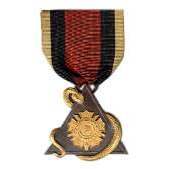
I do not know the significance of the bar used on the ribbon.

  • Author
#4

I put their website in my original post, but thank you for doing so as well.

Create an account or sign in to comment

Account

Navigation

Search

Search

Configure browser push notifications

Chrome (Android)
  1. Tap the lock icon next to the address bar.
  2. Tap Permissions → Notifications.
  3. Adjust your preference.
Chrome (Desktop)
  1. Click the padlock icon in the address bar.
  2. Select Site settings.
  3. Find Notifications and adjust your preference.