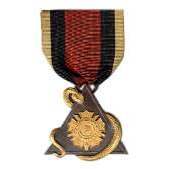
October 30, 20223 yr #1 National Society Women Descendants of the Ancient and Honorable Artillery Company The object of this Society shall be to aid in perpetuating and honoring the memory of the Military Company of Massachusetts, afterward known as the Ancient and Honorable Artillery Company of Massachusetts, who fought for the protection of the American Colonies and who died in establishing their independence. The Honourable Artillery Company was incorporated in London, England, in 1537. Kings of England were included among its members from the time of its organization. Members who came to the New World formed a Company in Boston, Massachusetts, a century later in 1637.
October 31, 20223 yr #2 I have never seen this badge Kevin. Congratulations on your find and a great write up.
October 31, 20223 yr #3 I have been to the Ancient & Honorable Museum at least 5 times and they do not have a membership medal like that on display!! Nice find!! Bill
November 2, 20223 yr Author #4 In all honesty, this image comes from the wdahac.wixsite.com web page on insignia for the organization. I should be so lucky to have one like this in my collection. Added information about National Society Women Descendants of the Ancient and Honorable Artillery Company membership insignia, the placement of pins and insignia on its official ribbon is as follows: Date Bar National Officer National Chairman Court President Ex-Court President Court Bar Ancestor Bars Page Pin Recognition Pin 25 Year Pin Life Member Pin





Create an account or sign in to comment