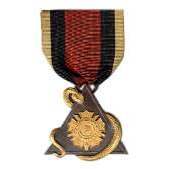
February 10, 20215 yr #1 I recently obtained this 104th Infantry Veteran AEF Association Past Commander badge. I am not familiar with this organization and believe it to be defunct, or to have merged with another veterans' organization.
February 15, 20215 yr #2 I have one of these with a 1959 Bar in a group - I was able to determine the recipient by checking old newspaper articles for the Springfield Mass. Newspapers. Bill
February 15, 20215 yr #3 I think this group was merged with the YDVA (Yankee Division Veterans Association) Bill
February 15, 20215 yr #4 William R Connelly was the Past Commander in 1959 - He was a Bandsman who served as a Medic/Stretcher Bearer in WWI with the 104th
February 15, 20215 yr #5 Your guy would be Roswell F Patch who served with the 104th in WWI https:public.maximus.newsbank.com:images:L00000010:cache:pdf:pl_12F473F7A5796990_1613429274061.pdf
February 15, 20215 yr #6 Another https:public.maximus.newsbank.com:images:L00000003:cache:pdf:pl_12FABFAAF057D427_1613429653858.pdf
February 16, 20215 yr Author #7 For those who may have difficulty with the above attached .pdfs, I have made the relevant sections into .jpg
February 16, 20215 yr Author #9 On 2/15/2021 at 4:51 PM, USMCR79 said: Your guy would be Roswell F Patch who served with the 104th in WWI Bill, Thank you very much for the ID. I would not have thought to associate the badge and date bar with the Yankee Division Veteran's Association. But, it makes sense to do so. It is great to see your Past Commander badge as well. I wasn't sure if mine had its original ribbon. Seeing a similar one on yours tells me that it is. Regards! Kevin



Create an account or sign in to comment