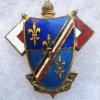
March 9, 20206 yr #1 Does anyone know anything about this 71st Signal Service Bn DI? It just sold on eBay for $127 and of course is not in the ASMIC guide (but we will all be dead by the time ASMIC ever updates the 1986 black and white catalogue) obviously Japanese made but the pin is horizontal and I cant tell if its a real DI or a scarf, sweetheart or lighter piece.
March 9, 20206 yr Author #3 Yes, the third pic is #71A1 and while rare is fairly well known. The first pic I posted is an uncatalogued variation. The ASMIC Signal catalogue is not very reliable when it comes to these older theatre produced variations. Story I got many moons ago was Apparently there was internal feuding over the numbering classification system? They were also concerned about the fakers getting ahold of color pictures as they might crank up the machines again.
March 11, 20206 yr #5 I don't think the Forum has anything to do with ASMIC updating catalogs. Maybe you should contact your Area VPs for info? Perhaps volunteer to work on a catalog? FWIW, there have been a number of DI catalogs updated to full color, and even some new catalogs. Inf, cav arty MRS CWS off the top of my head, but you can always check the ASMIC website.



Create an account or sign in to comment