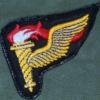
March 4, 20188 yr #1 Interesting patch, velcro backed and oversized. Missing the grenade, field artillery CAB? Found in Kabul 2018
March 4, 20188 yr #4 Looks like an old fashioned fountain pen. LOl...Maybe the Shaeffer or Parker Combat Clerk Badge
March 4, 20188 yr #6 As a young Army draftsman in 1970 on Okinawa, I and my S3 drafting room compatriots designed a "Combat Draftsman Badge" as a joke. I wish we'd had a few made. It had a T-square instead of a musket on a red and white background (Engineer colors). Of course, nowadays no one would know what a T-square is.
March 5, 20188 yr #7 As a young Army draftsman in 1970 on Okinawa, I and my S3 drafting room compatriots designed a "Combat Draftsman Badge" as a joke. I wish we'd had a few made. It had a T-square instead of a musket on a red and white background (Engineer colors). Of course, nowadays no one would know what a T-square is. By cracky, some of us do remember what a T square is/was. Both my younger brothers were architects.




.jpg.2ce6a8d90c750304bcf9d4faa9318f5d.jpg.bcc95b69e7ce07930b4a7bee09f4e38f.jpg.59a43eae12d7f0843d77c803d3a4c487.jpg)
Create an account or sign in to comment