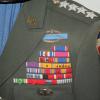
November 23, 20178 yr #1 I purchased this unidentified ribbon bar off the forum a couple days ago thinking I MIGHT be able to ID it. It took me reading the bio of every WWII Army General Officer (~5 hours), but this is now positively identified to Brigadier General Samuel D. Sturgis III, the Sixth Army Engineer in WWII. He later became a LTG and Chief of the Corps of Engineers in the 50s. I was lucky to find a photo of him wearing the exact, or a duplicate version of this setup. The photo is on the way in the mail, but in the meantime here is a snippet of it.
November 23, 20178 yr #2 I'd go with exact...what're the odds of having the APC stars in that exact wavy configuration twice?
November 23, 20178 yr #3 Nice job, Justin! I'm impressed. Looks like the backing is sliding through the ribbons in the photo - at least the second row. Maybe a bit on the top row, too. Does this happen on the rack you have? Rob
November 24, 20178 yr Author #4 Rob, Slightly less on mine than in the photo. Could be the same, if not, it's VERY close!
November 24, 20178 yr #5 I say its a duplicate set. The asiatic pac in the photo is inverted, the BWR central stripe is RWB in the photo; no matter... Either way its great research so far and finally identified





Create an account or sign in to comment