Skip to content
View in the app

A better way to browse. Learn more.

U.S. Militaria Forum

A full-screen app on your home screen with push notifications, badges and more.

To install this app on iOS and iPadOS
  1. Tap the Share icon in Safari
  2. Scroll the menu and tap Add to Home Screen.
  3. Tap Add in the top-right corner.
To install this app on Android
  1. Tap the 3-dot menu (⋮) in the top-right corner of the browser.
  2. Tap Add to Home screen or Install app.
  3. Confirm by tapping Install.

101st 187th Inf. Rakkasan ACH Helmet

Featured Replies

#1

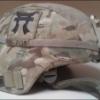
Here is one of my very recent additions, a 101st Airborne 187th Infantry Regiment "Rakkasans" ACH. An overall salty helmet, although the interior pads look to have been replaced (seems to be pretty common). It also has the TBI sensor in the crown. I have been searching for a patched helmet in multicam for a long time, and couldn't be happier with the result :)

As always, comments, opinions, and advice are appreciated! Hope you enjoy.


post-154150-0-74805900-1437437036.jpg

  • Author
#2

post-154150-0-55190600-1437437575.jpg

  • Author
#3

post-154150-0-56381800-1437437589.jpg

  • Author
#4

post-154150-0-83395900-1437437608.jpg

  • Author
#5

post-154150-0-41141700-1437437623.jpg

  • Author
#6

post-154150-0-33345600-1437437640.jpg

  • Author
#7

post-154150-0-80105900-1437437653.jpg

  • Author
#8

post-154150-0-94036900-1437437667.jpg

#9

It's interesting to me that 70 years later the helmet covers still have the slits like the WWII USMC ones. The patches are killer too. Im assuming they use them for the same purpose as the WWII tac markings. As much as things change, others remain the same. You've got to love it.


#10

Very nice helmet, congrats!

#11

Thats a looker.......mike

Create an account or sign in to comment

Account

Navigation

Search

Search

Configure browser push notifications

Chrome (Android)
  1. Tap the lock icon next to the address bar.
  2. Tap Permissions → Notifications.
  3. Adjust your preference.
Chrome (Desktop)
  1. Click the padlock icon in the address bar.
  2. Select Site settings.
  3. Find Notifications and adjust your preference.