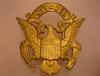
April 19, 201511 yr #1 I just acquired these from a picker friend of mine. He originally obtained the pair from a vet who was an NCO in the 1940's. The vet stated he was an NCO assigned to the 9th Division HQ (or general staff) in the 1940's and wore the pictured badge on his pocket while in this assignment. Normally I would have assumed this was some sort of "sweetheart" jewelry, but a few things made me think it may have actually been a uniform badge: 1. The DUI applied to the badge is identical to the loose "patch type" DUI that came with it- a very high quality DUI hallmarked by Robbins & Co 2. The reverse finish of the loose DUI is identical to the reverse finish of the badge - high quality matte finish. This would indicate the DUI was actually applied to the badge at the Robbins factory on a background badge manufactured by them. 3. The badge is very heavy with a very substantial pin back assembly (nothing like I have seen on sweetheart jewelry). I was wondering if anyone has ever heard of a 9th Infantry Division HQ/General Staff Badge? I guess I'd have to luck into finding a period photo of it being worn to prove it's not a piece of sweetheart jewelry.



Create an account or sign in to comment