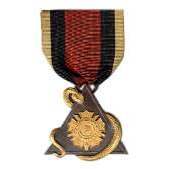
November 30, 201114 yr #1 THE MILITARY ORDER OF STARS AND BARS "Male descendants of the officers who honorably served in the Army, Navy and other commands of the Confederate States of America and male descendants of the elected and appointed civilian officials of the Confederate States; the national Confederate Government; or the Five Civilized Tribes which allied with the Confederacy, unite to establish The Military Order of the Stars and Bars, a patriotic and fraternal Society." This membership badge is no longer in use and has been superseded by a newer version. If any member of the MOSB has images of the latest badge, please post them here for comparison and study. Kevin
December 6, 201114 yr #3 Kevin, I've never heard of this organization, interesting reading in its self!
December 10, 201114 yr #4 Do you know how to apply for this award? We have acouple of members of the family who served it would be great to have something like this. @@
December 10, 201114 yr Author #5 This is a membership badge for an organization and not an award as such. Only qualifying members are allowed to purchase them from the MOSB quartermaster. The qualification criterion for membership can be found on their website. Military Order of the Stars and Bars: JOIN US Or,... you can buy a badge like this on eBay like I did. Kevin


.jpg.2ce6a8d90c750304bcf9d4faa9318f5d.jpg.bcc95b69e7ce07930b4a7bee09f4e38f.jpg.59a43eae12d7f0843d77c803d3a4c487.jpg)
Create an account or sign in to comment