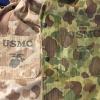
June 9Jun 9 #1 Usually im pretty good at distinguishing between repro covers and originals. But lately ive noticed repros have been getting better and this one has honestly stumped me. Its actually just one aspect of the cover. Stitching, double-weave stitches, pacman, saw-tooth on the flaps, background color on the green side, every box checked. Even half of the beach side looks up to par. But the other side of the beach looks a little different. The browns look a little too dark. Maybe its just me? Have shown this to a couple other collecting buddies of mine and most seem to agree its original. But I want to get more opinions. The beach side in question: Another photo of the same beach side. Browns look a little darker than usual.
June 9Jun 9 #2 Hi, I am by far no expert (especially not on helmet covers), but I thought, I would pitch in. The different colors can maybe be explained by different manufacturing runs. Maybe one roll of fabric ended and the new one was a bit darker, but as camouflage is camouflage to the manufacturers, they just finished the cover (started with the old fabric) with the new one. This might be more visible on this example, as it looks to be almost brand new. If it had been used, maybe the difference in shade would have been less obvious? It does not look like a repro to me from my limited knowledge standpoint. I would love to hear some more knowledgeable people chime in :) Cheers, Jules





Create an account or sign in to comment